Why We Stopped Screen-Sharing With Customers, and What We Built Instead
Texting a customer a screen-share link is how a lot of phone-based teams walk someone through a plan. We built a client something better: a live presentation drawn on the customer's own phone, showing only what they're meant to see.
A lot of selling and advising still happens on the phone. Insurance, financial planning, home services, healthcare intake: an expert on one end, a customer on the other, and something important to explain. Read aloud, options and figures blur together, so the customer needs something to look at.
The usual answer is a screen share. The advisor texts a link, the customer taps it, and their phone shows a live view of the advisor's screen. It's quick, there's nothing to install, and it works.
We recently built a client a replacement for exactly that setup. Their advisors walk customers through a plan by phone, and screen sharing had become the weakest part of the call. This post covers why, what we built instead, and what we learned that applies to any team that sells or advises by phone.
What's wrong with screen sharing
Screen-sharing tools are good at what they're built for: demos, support, showing someone around an app. A customer conversation asks more of them.
- It shows the advisor's screen, not the customer's plan. Whatever the advisor has open, the customer can see: other customers, internal notes, the rest of their tools. Keeping private information off the call depends on nobody clicking the wrong thing. That's a habit, not a safeguard.
- A desktop screen on a phone is hard to read. The page was designed for a monitor. Shrunk to a phone and sent as video, the text is tiny, and pinch-to-zoom on a video is nobody's idea of a good way to read the details of a plan.
- It tells the advisor nothing. Is the customer still looking? Did they fall behind? Is their connection struggling? A video stream doesn't say.
- The document lives somewhere else. The call ends with a PDF made in another tool, which may or may not match what was discussed.
What we built: a live presentation on the customer's phone
We kept what worked, a texted link with nothing to install, and replaced the rest.
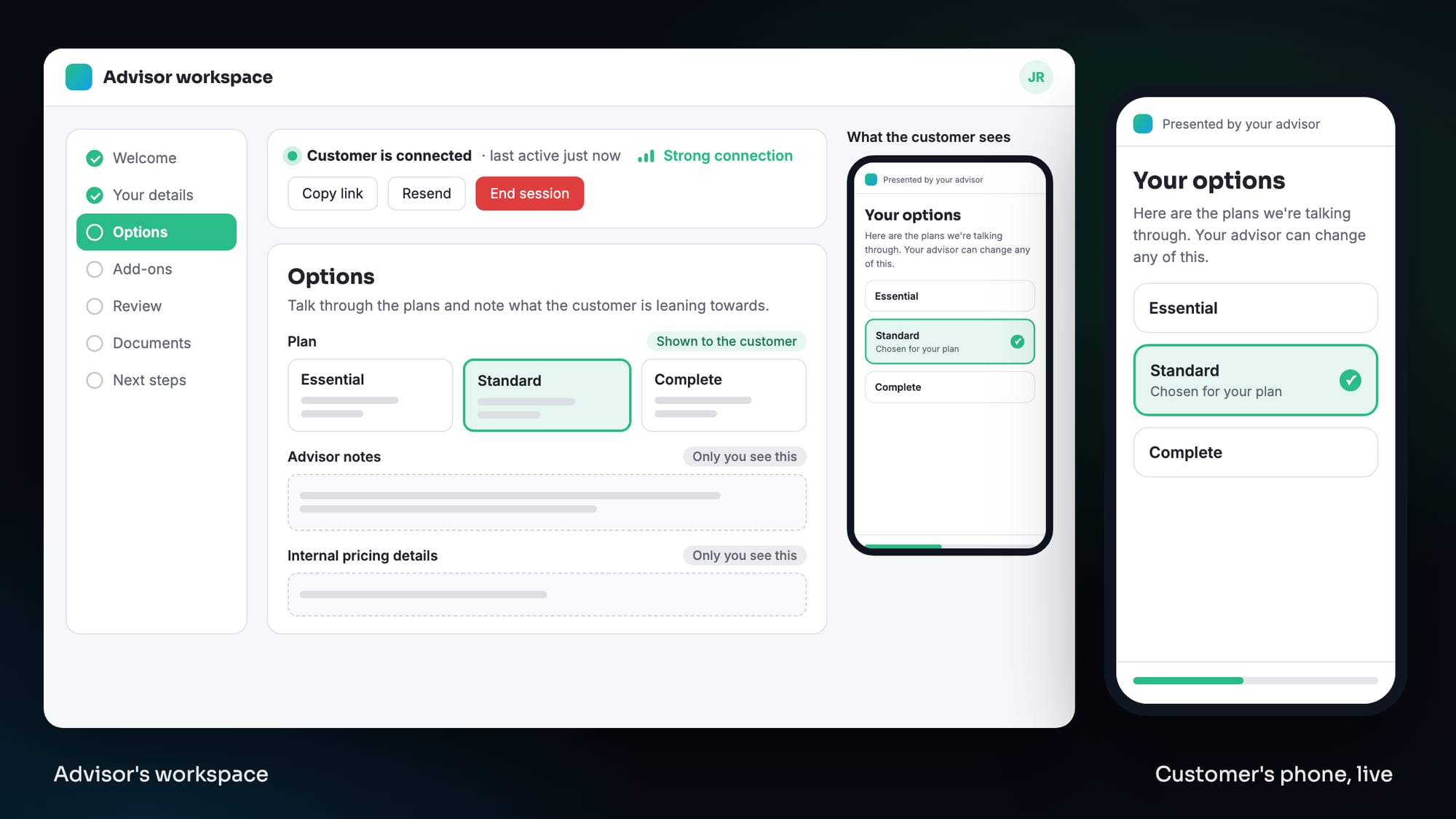
The advisor runs the conversation from the same system they already use. They start a session and the customer gets a one-time link by text. When the customer taps it, their phone shows whichever step the advisor is on, and follows along as the advisor moves through the conversation. The customer stays on the call, the advisor does the typing, and the plan comes together in front of them.
Press play, with sound on. The advisor's dashboard is on the left, the customer's phone on the right. Shared details appear as they're typed, private notes never leave the advisor's screen, and the customer can browse a catalog full-size while the advisor sees what they're looking at.
The difference is in what reaches the phone.
Send data, not video
Our first version was a screen share built into the client's system, and it had the same two problems as every screen share. So we changed what gets sent.
The customer's phone no longer receives video. For each step, the advisor's side builds a small bundle of data that holds only the fields the customer is allowed to see, picked one by one. That bundle goes to the phone over a live connection, and the phone draws its own screen from it, designed for a phone from the start: large type, simple cards and a progress bar.
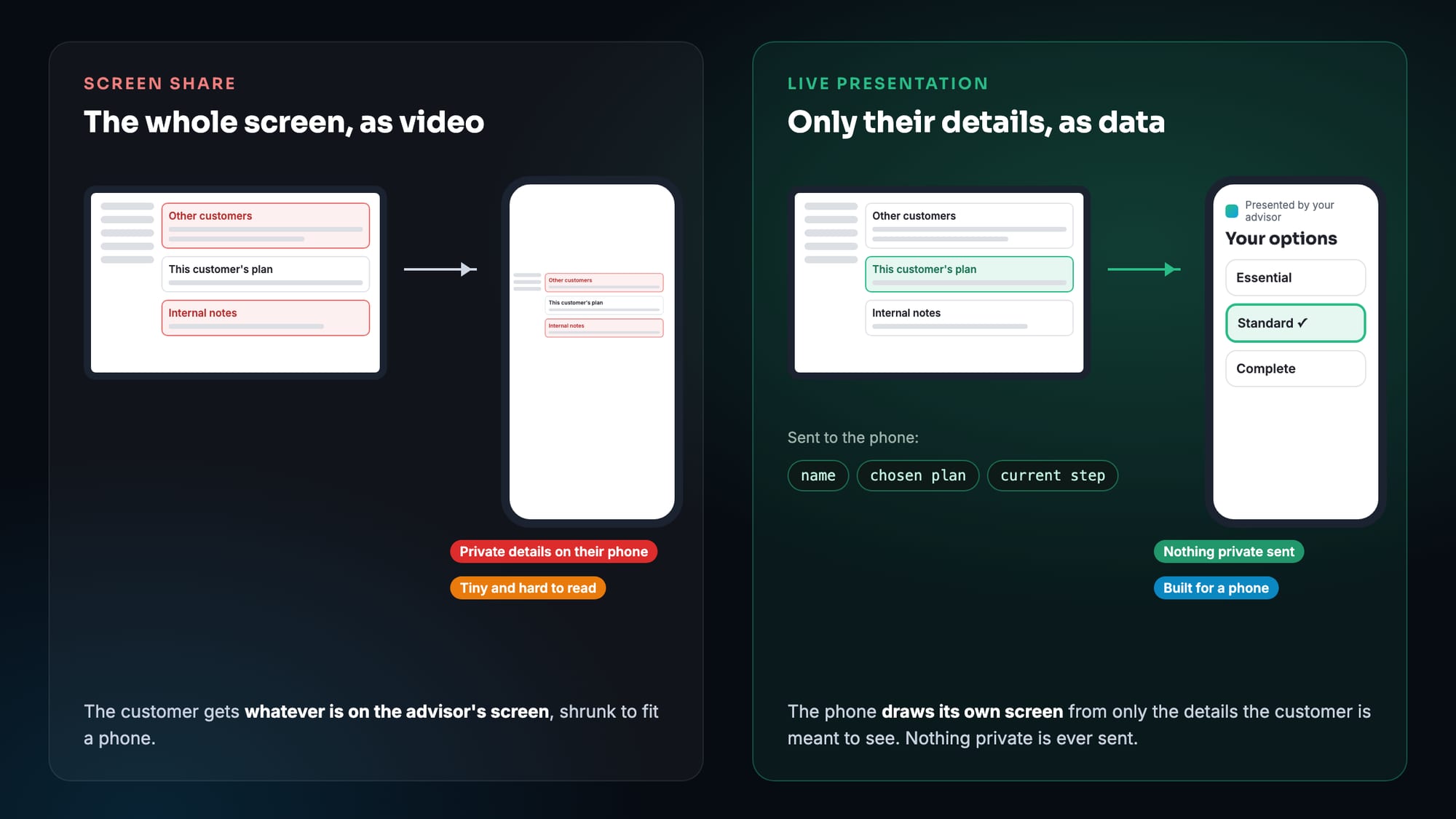
That one change gave us a lot:
- Privacy is a list, not a habit. Phone numbers, internal notes and internal pricing details are never put in the bundle, so they can't reach the customer's phone. Anything new added to the system stays private until someone deliberately decides the customer should see it, and an automated test fails if a private field ever slips into what the customer receives.
- The advisor sees exactly what the customer sees. The advisor's screen includes a live preview of the customer's phone, built from the same components and the same data, so the two can't drift apart.
- Every field says who sees it. In the advisor's view, each field is labelled either shown to the customer or only you see this, so there's never any guessing mid-call.
It has costs, and we'd make the trade again. Every step needs its own phone screen, because nothing appears on the customer's phone just because it's on the advisor's monitor. Those screens also have to work without the customer signing in. We considered a shortcut, sending the whole record to the phone and hiding the private parts there, and rejected it: hidden data is still data on someone else's device.
Knowing the customer is still with you
On a phone call you can't see whether the other person is looking at anything. So the advisor's screen tells them:
- Whether the customer is connected, when they joined and when they were last active
- How good their connection is, so the advisor knows to pause while a slow phone catches up
- Where the customer is on the page, including scrolling and zooming, with the preview drawn at the size of their actual screen
- What they tap, shown as a ripple on the advisor's preview
- What they're looking at in a catalog, so when the customer swipes through products or options on their phone, the advisor knows which one to talk about, and can add it to the plan in one click
Details also appear on the customer's phone as they're typed. When the advisor fills in a name, it shows up in front of the customer straight away, which is exactly when they'd say "no, it's spelled with two Ls."
Ending the call with a document that matches it
At the end of the conversation the advisor generates the customer's document, and the customer reads it on their phone, page by page, while they're still on the call. The same file is theirs to keep.
A few decisions behind that document are worth borrowing:
It's built from a saved copy of the plan, not the live one. Records keep changing after a call: prices move, details get edited. So when the document is generated, a snapshot is stored with it, and nothing is read from the live record while it's drawn. A second, narrower step pulls only the customer-safe parts out of that snapshot. Documents are versioned and never overwritten, and if the plan changes afterwards, the advisor can see what changed and generate a new version.
It renders off the main thread, and we learned that the hard way. The first version drew the PDF inside a background job on the server's main thread. Then a real plan sent the PDF library's layout engine into an endless loop, and the whole server stopped answering, health check included. Now each document renders in its own worker thread with a time limit and a memory cap, so a runaway render can't take the rest of the app down with it.
Forms are configuration, not code. Where a standard form has to be filled in, it's driven by a template and a mapping file, so adding a new form doesn't mean writing new code.
Is this right for your team?
This approach fits any team that explains something important over the phone and ends with a document:
- Insurance and financial planning, where a customer needs to see their options, not hear them read out
- Home-service quotes, walking a homeowner through a proposal while they're on the call
- Healthcare intake, confirming details with a patient without exposing anyone else's
- B2B onboarding, taking a new customer through setup and leaving them with a record of it
Some signs it's time:
- Your advisors screen-share and then email a PDF afterwards
- You've worried about what a customer might see on an advisor's screen
- Customers ask for details to be repeated because they couldn't read them
- The document at the end has to be rebuilt by hand to match the call
For demos and general support, a screen-sharing tool is still the right answer. Build something like this when the presentation is your sales process, and when it has to draw on your own data, show each customer only their own details and produce the document from what was decided. We compare the two paths in custom software vs. off-the-shelf platforms, and the same thinking about clear, calm screens runs through designing technology that feels simple and welcoming.
Want your customers to see the plan, not your screen?
KeyesCode builds custom software that fits how a business already works. If your team does its most important conversations by phone, get in touch and tell us how those calls go today.
Frequently asked questions
What's wrong with screen sharing for customer calls?
Two things. A screen share shows whatever is on the advisor's screen, including other customers, internal notes and the rest of their tools, so privacy depends on nobody clicking the wrong thing. And a desktop screen shown as video on a phone is small and hard to read, even with pinch-to-zoom.
What is a live guided presentation?
The advisor runs the conversation from their own system and texts the customer a one-time link. The customer's phone then shows whichever step the advisor is on, drawn as a proper phone screen. Instead of video, the phone receives only the details the customer is meant to see, so private information never reaches it.
Does the customer need to install an app?
No. The link opens in the phone's browser. There's no app to download, no account to create and nothing for the customer to fill in. They stay on the call and watch the plan come together while the advisor does the typing.
Which businesses is this a good fit for?
Any team that explains something important to a customer over the phone and ends with a document: insurance and financial planning, home-service quotes, healthcare intake, onboarding for B2B services. If your advisors screen-share today and then email a PDF, it's worth a look.
Should we buy a screen-sharing tool or build this?
For demos and general support, a screen-sharing tool is the right call. Build when the presentation is your sales process: when it has to draw on your own data, show each customer only their own details, and finish with a document generated from what was decided on the call.
Have a project in mind?
Tell us what you're trying to build or fix, and we'll give you a straight answer on what we'd do next. No pitch, no pressure.