Liftva: An AI Workout Tracker That Shows Its Math
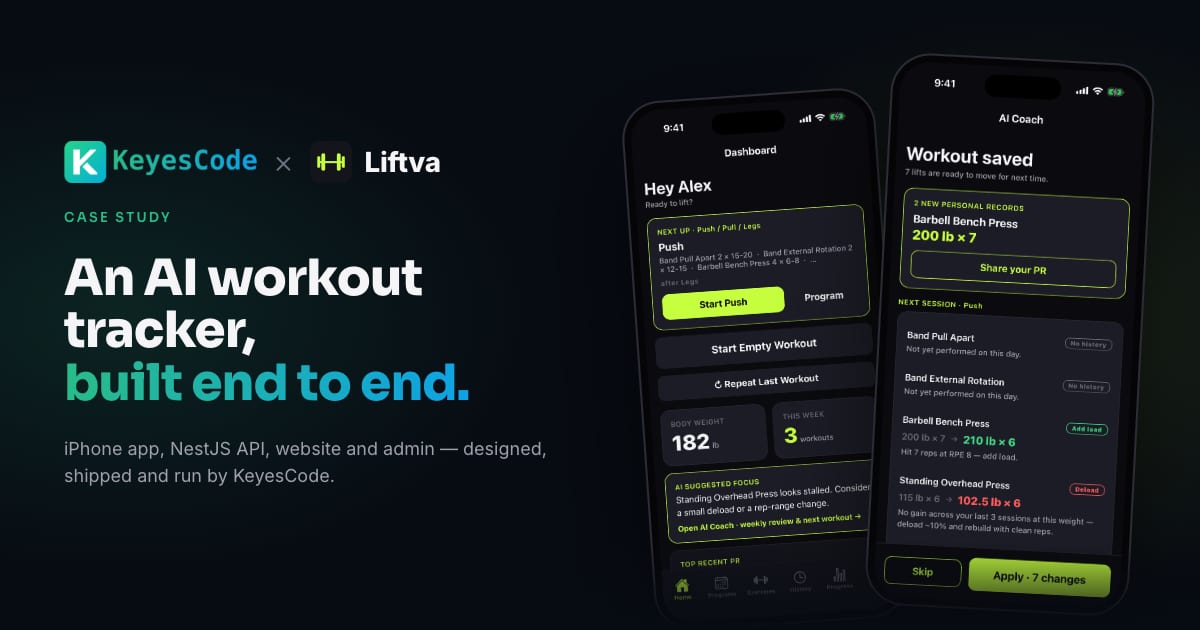
Liftva is an iPhone workout tracker we designed and shipped for lifters who are tired of guessing what to put on the bar. It logs every set, spots the lifts that have stalled, and plans the next session lift by lift, with an AI coach that explains the numbers but never invents them.
Most people who lift seriously have the same problem, and it isn't motivation. It's the question at the start of every set: what should I put on the bar today?
Most workout apps will happily record the answer after the fact. They're good notebooks. What they don't do is read the notebook back and tell you that your bench has been climbing, that your overhead press hasn't moved in three weeks, and what to do about each one next time. So lifters guess, push through a stall that called for a deload, or stop progressing without noticing.
Liftva is our answer to that. It's an iPhone app that logs every set, spots the lifts that have stalled, and plans your next workout lift by lift, with an AI coach that explains the plan in plain English. It's live on the App Store, with a website at liftva.com and an admin dashboard that runs the business behind it.
This post covers what Liftva does, the design decisions behind it, and what we'd tell anyone planning a similar app.
The brief: a training log that actually reads your training
We set three goals for the product before designing a single screen.
- Logging has to be faster than a notebook. If it takes more effort than scribbling on paper between sets, nobody will keep it up, and there's no data to coach from.
- Every suggestion has to be explainable. "Add 10 lb" is only useful if the lifter can see why, and trust that it came from their own history.
- The AI must never invent a number. A coach that tells you to lift a weight it made up isn't a coach. It's a risk.
That third rule shaped the whole app, and we'll come back to it.
What Liftva does
Home answers one question: what do I do today?
Open the app and the first thing you see is your next training day. If you follow a program, Liftva knows you did Legs last time and puts Push at the top, with the exercises listed and a Start button. Below it are your body weight, this week's workouts, your most recent personal record and a suggested focus for the week.
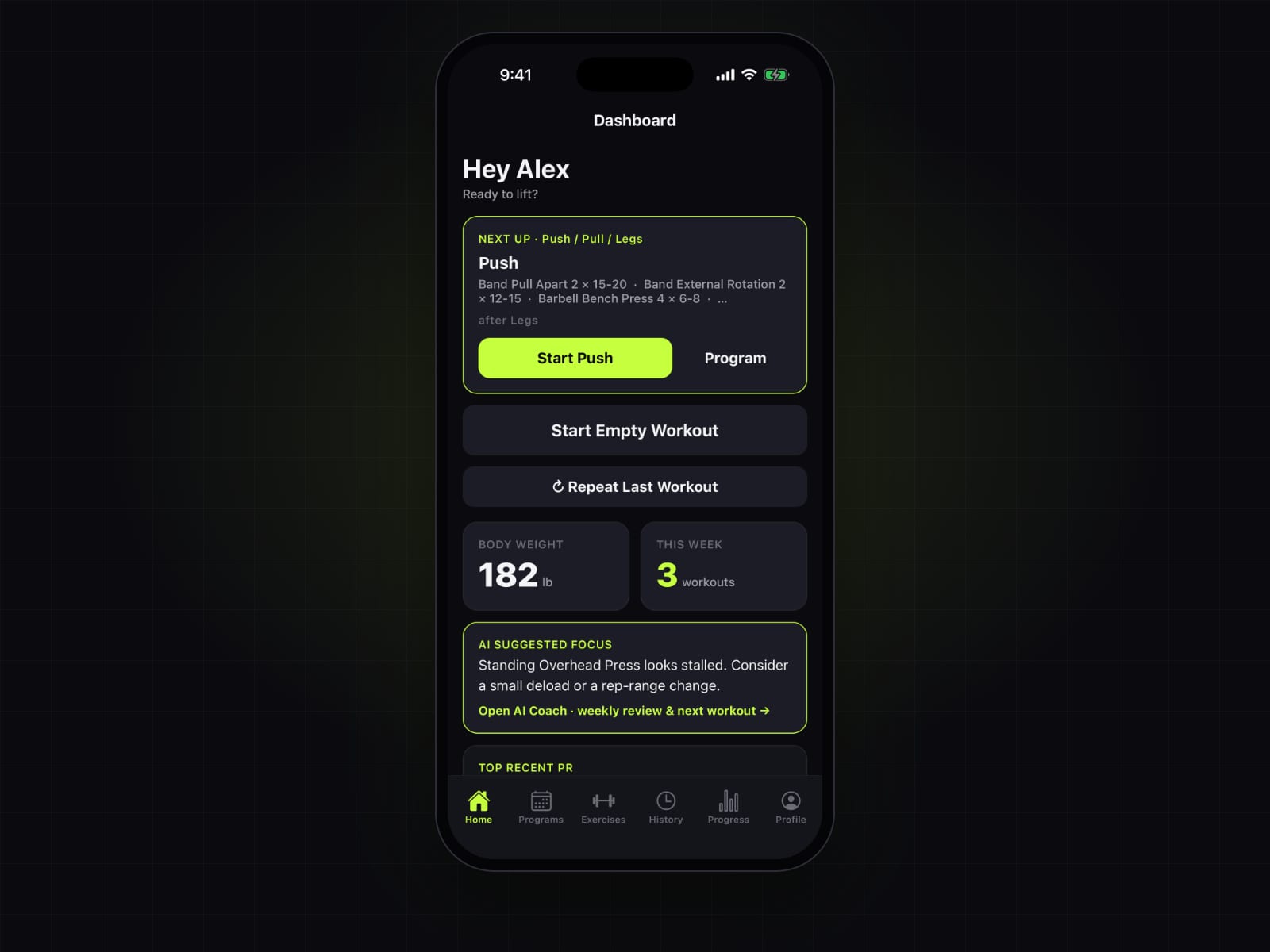 Home always answers "what do I do today?"
In the example above, the suggested focus is a real warning, not filler: our demo lifter Alex's overhead press has stalled, and the app says so before Alex walks into the gym.
Logging a set takes one tap
During a workout, every set comes prefilled with the weight, reps and effort (RPE) from the closest set you logged last time, shown in grey. If you did what it says, one tap on ✓ logs it. If you didn't, you change the number first. The rest timer starts the moment a set is ticked.
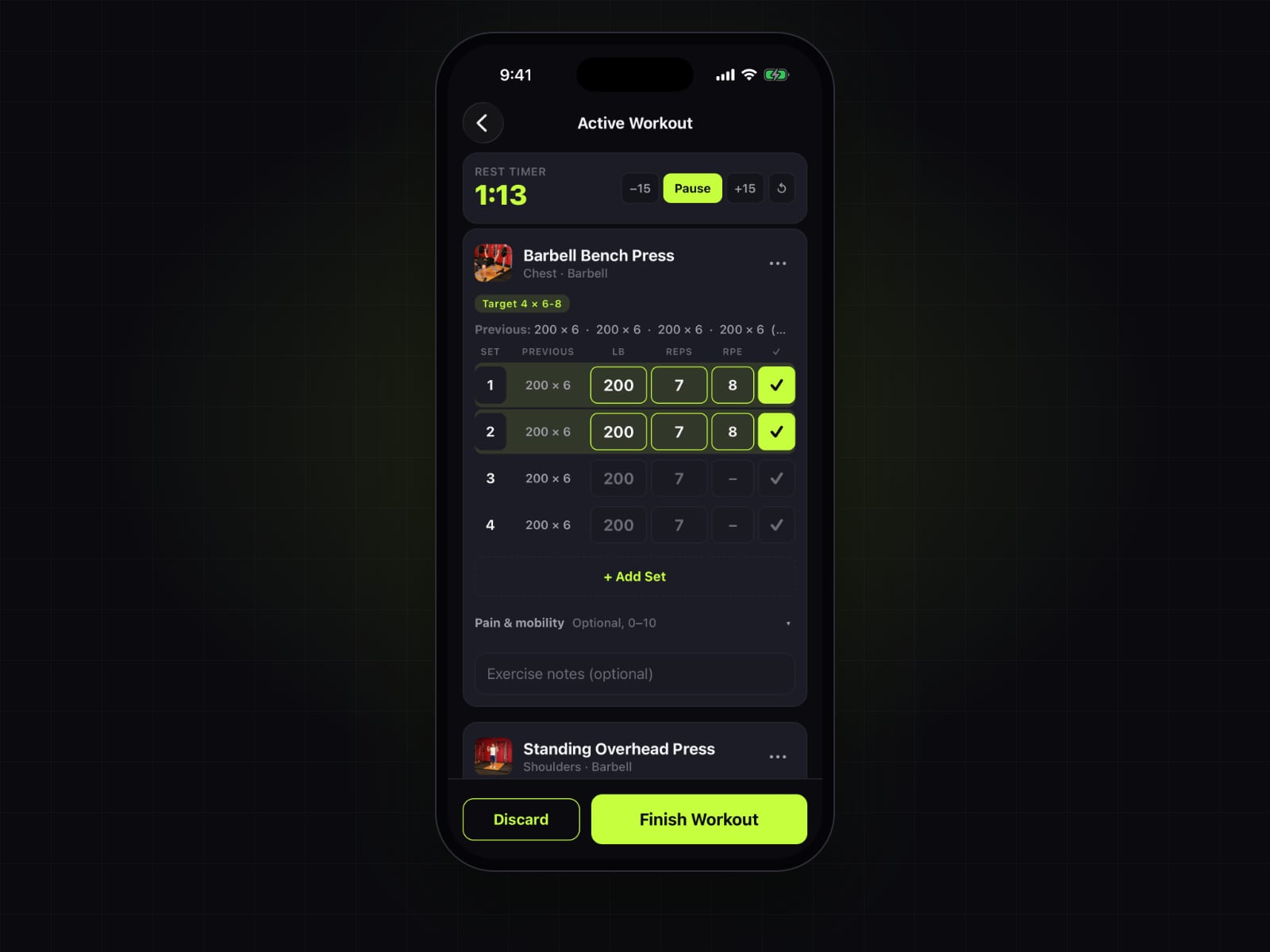 Placeholders prefill from the closest logged set, and ✓ logs them in one tap.
Warm-up sets are tracked but kept out of your analytics, so a light first set never drags down your numbers. Weights can be in pounds or kilograms, and your history stays exact either way.
The rest timer follows you to the lock screen
Between sets your phone should be in your pocket, not in your hand. Liftva puts the current exercise, set and rest countdown on the lock screen and in the Dynamic Island as a Live Activity, and on the Apple Watch's Smart Stack.
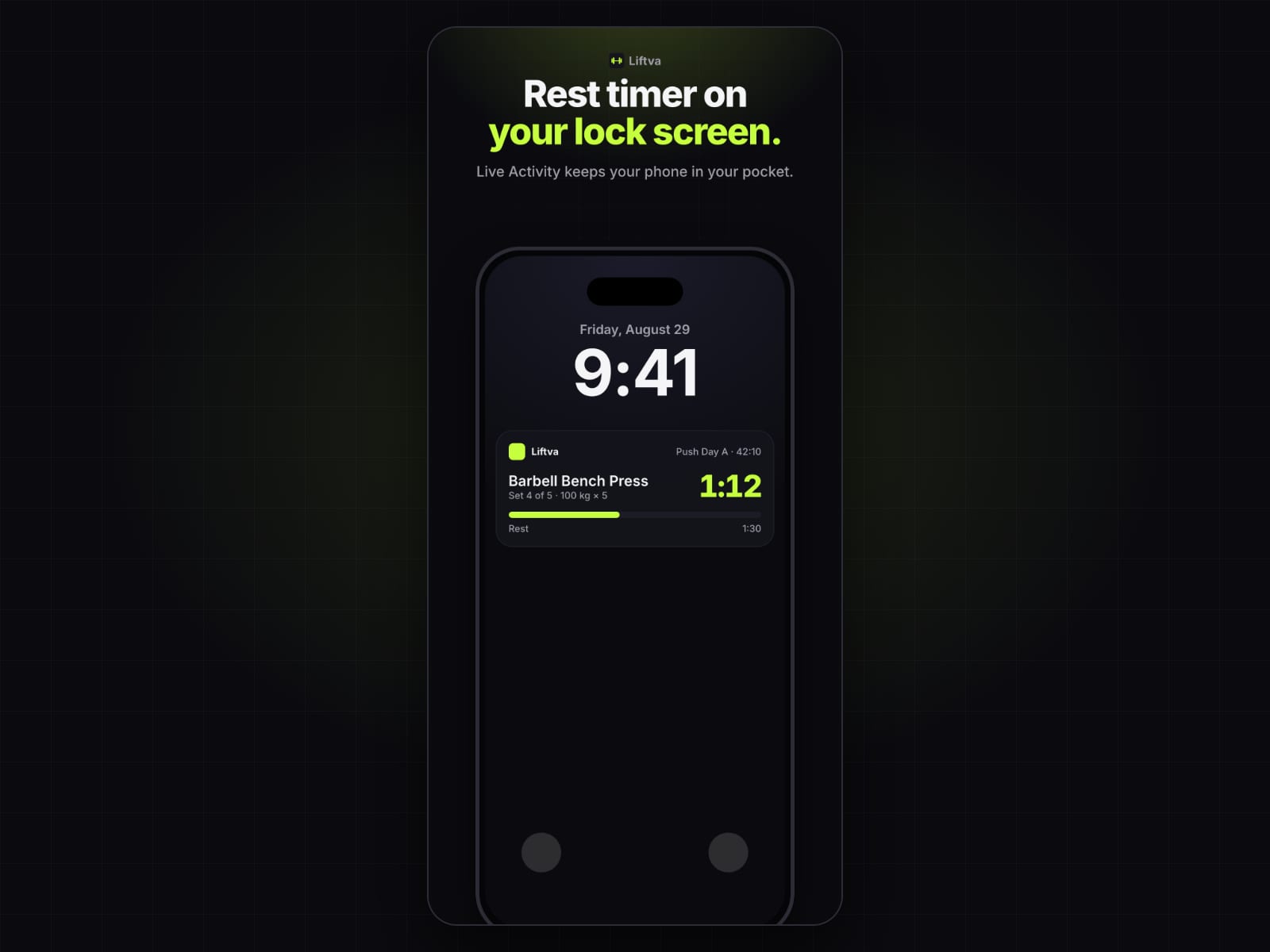 The rest timer on the lock screen. (App Store artwork.)
Finishing a workout plans the next one
When you finish, Liftva shows the session's duration, volume and sets, and flags any new personal records before the workout is even saved. Then the coach takes over.
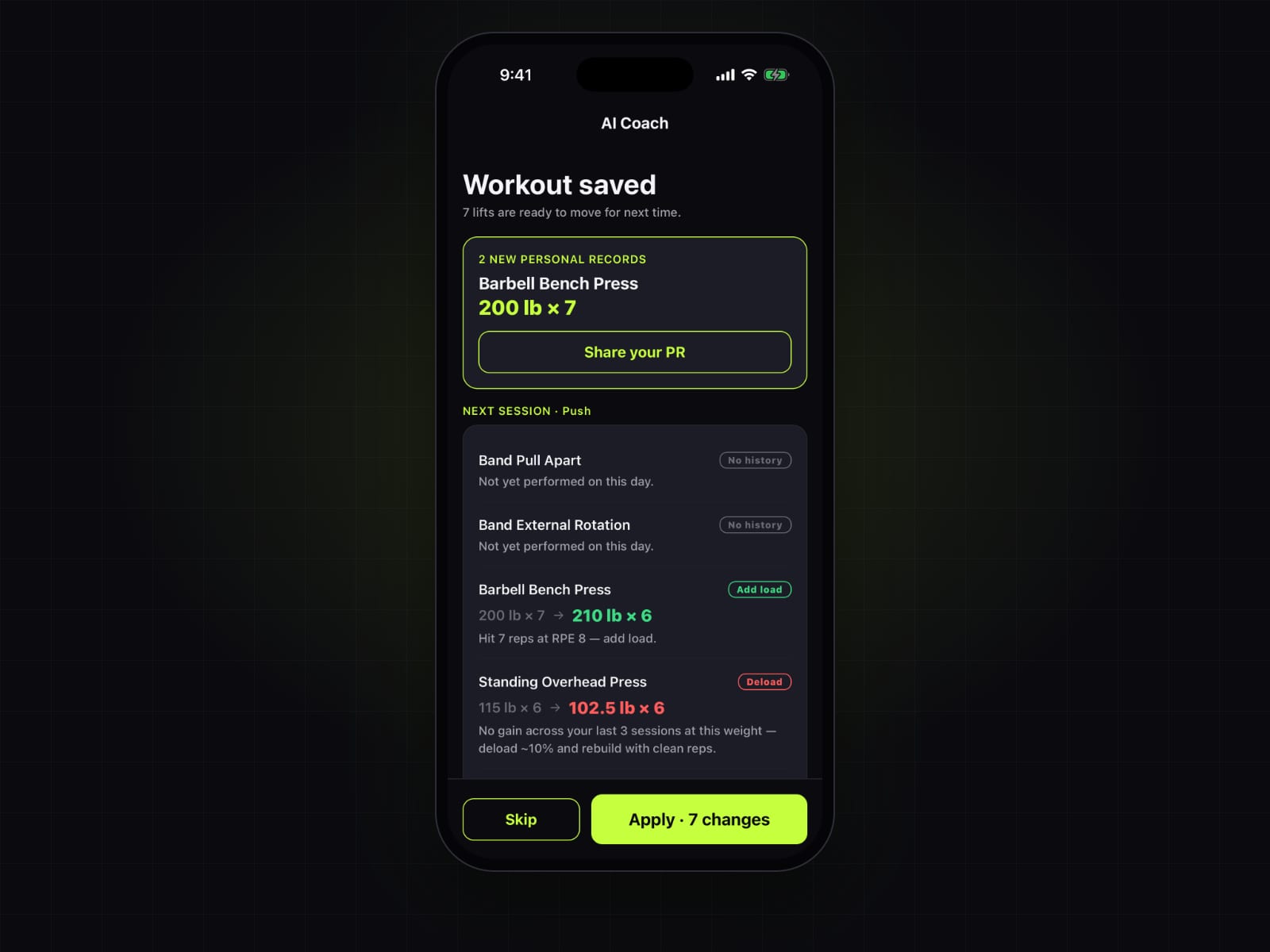 After every session the coach plans the next one, lift by lift.
This is the screen we're proudest of. For every lift in that training day, it shows what you did, what to do next time and why, in one line:
- Barbell Bench Press: 200 lb × 7 → 210 lb × 6. "Hit 7 reps at RPE 8, add load."
- Standing Overhead Press: 115 lb × 6 → 102.5 lb × 6. "No gain across your last 3 sessions at this weight. Deload ~10% and rebuild with clean reps."
Nothing changes until you say so. Apply updates the program with all the suggestions; Skip leaves it alone. The lifter stays in charge of their own training.
New records also get a share card, built on the phone, sized for a story.
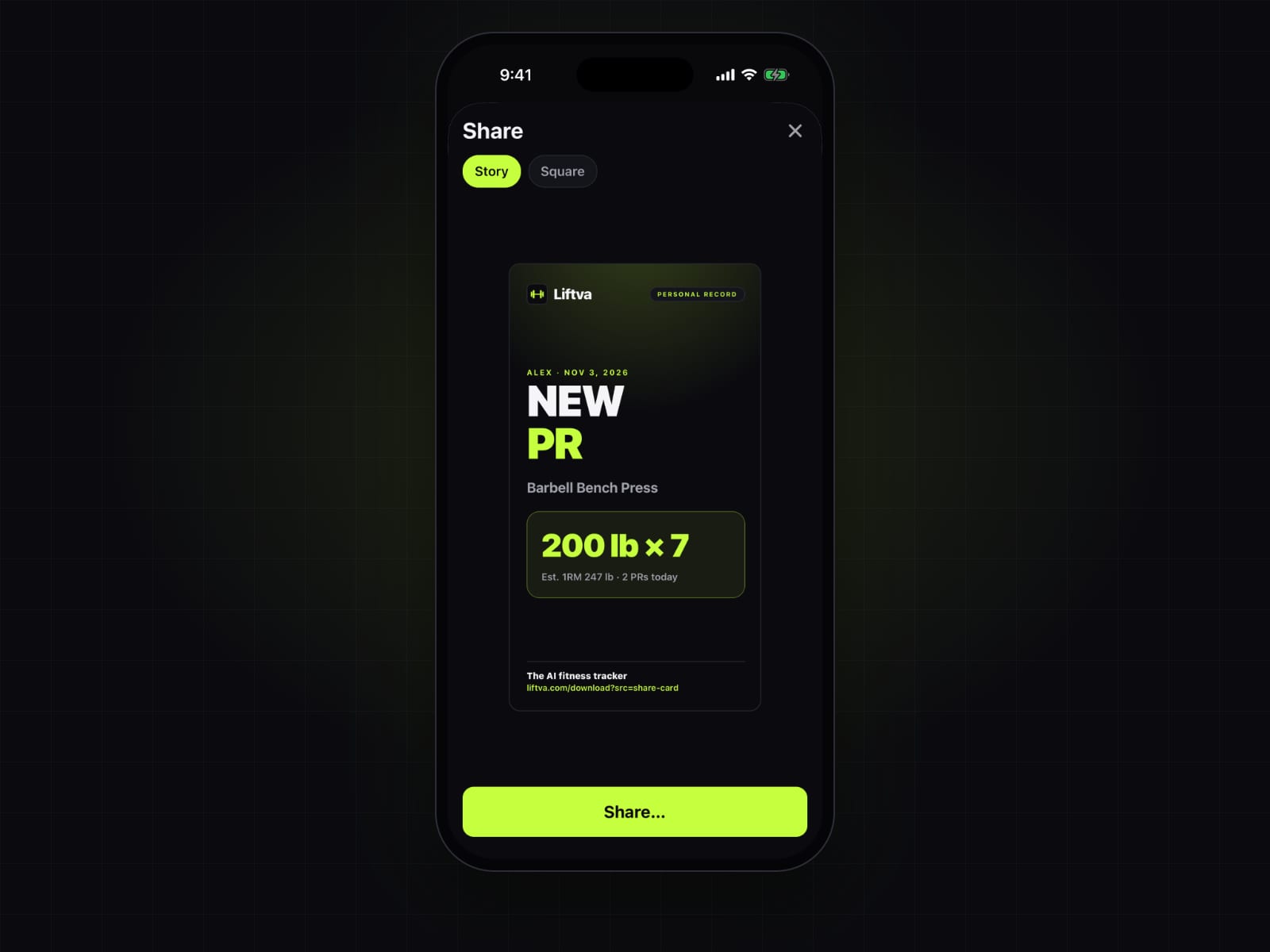 A shareable PR card, generated on the phone.
Progress you can read at a glance
Every lift gets a one-word verdict: progressing, holding or stalled. Behind it are the best set, the top set session by session, and an estimated one-rep max trend that folds weight and reps into one number you can follow over time.
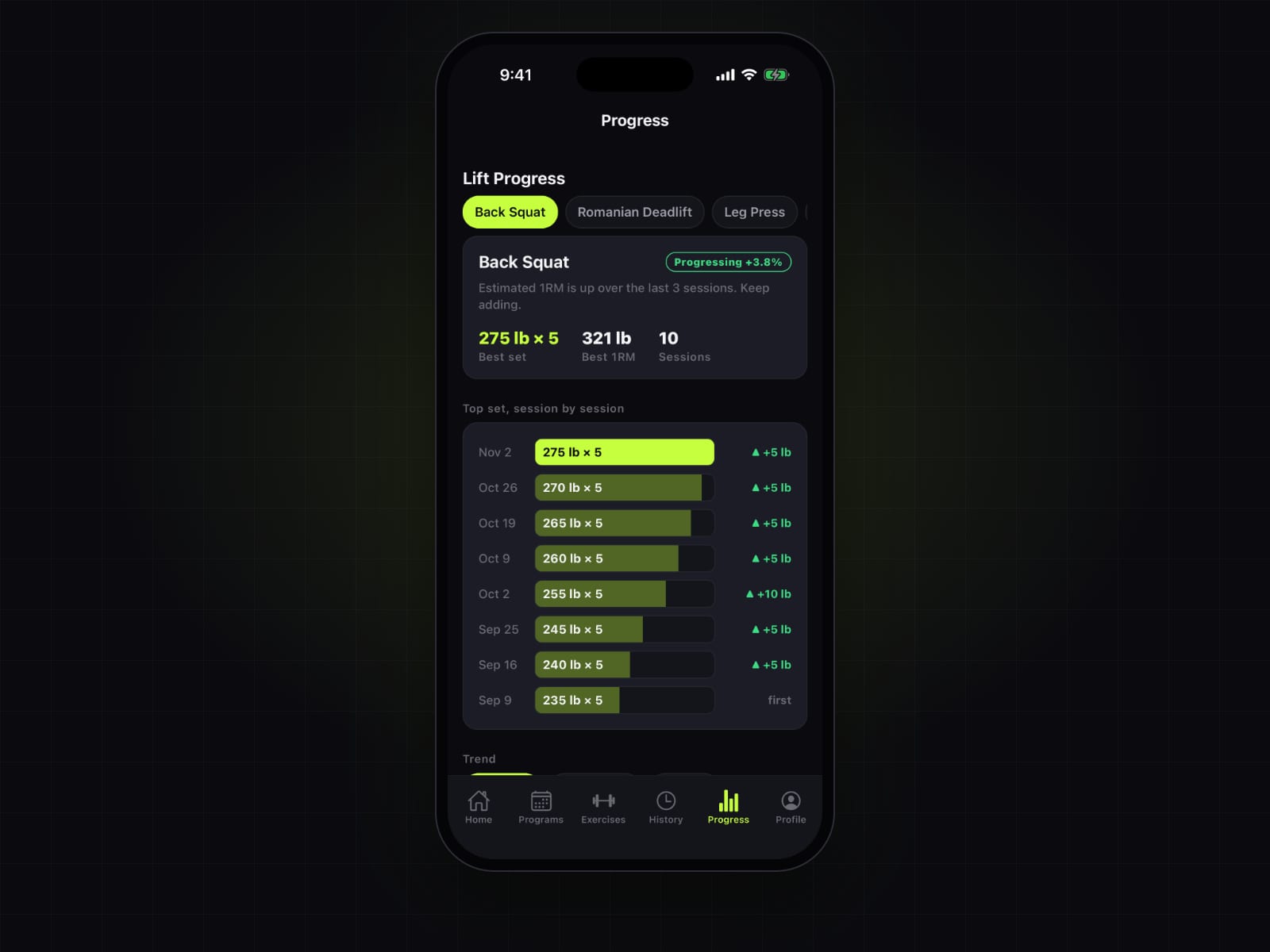 Every lift gets one verdict: progressing, holding or stalled.
Personal records are rebuilt from your full history rather than stored once and forgotten, so if you edit or delete a workout, your records stay honest.
Programs, routines and a 365-exercise library
Lifters can follow a built-in program, such as Push / Pull / Legs, or build their own. Following a built-in program copies it into your library, so you can change it without breaking anyone else's. Each training day works out its next loads from its own history. The exercise library has 365 exercises, each with a photo, searchable by muscle, equipment and category.
The design decision that matters most: the AI explains, it never invents
It's tempting to build a fitness app by sending someone's workout history to an AI model and asking it what to do next. It demos well. In practice it's a bad idea, for three reasons:
- Language models are bad at arithmetic and worse at consistency. Ask the same question twice and you can get two different weights. In a gym, a made-up number isn't a typo. It's a possible injury.
- Users can't check the reasoning. If the suggestion comes from a black box, there's no way to tell a smart call from a hallucination.
- It's expensive, and it breaks when the AI service is down. An app that can't suggest a weight without a network call to an AI provider isn't one you can rely on.
So we split the job in two.
The numbers come from a progression engine with fixed rules. If you hit your target reps at an effort of 8 out of 10 or easier, the load goes up 2.5 to 5%, depending on your goal. If you've been grinding at RPE 9 or above two sessions running, it tells you to hold. If your estimated one-rep max hasn't improved across your last three sessions, or barely moved while the effort climbed, the lift is flagged as stalled and you get a deload of about 10%. Adding reps at the same weight counts as progress, so a lifter working up a rep range isn't wrongly told they've stalled. The same history always produces the same plan.
The AI writes the coaching around those numbers. The weekly review summarises what improved, what slipped and what to change, in plain language. If the AI drops or changes a number, the engine puts the original back. The engine is always the authority on what goes on the bar.
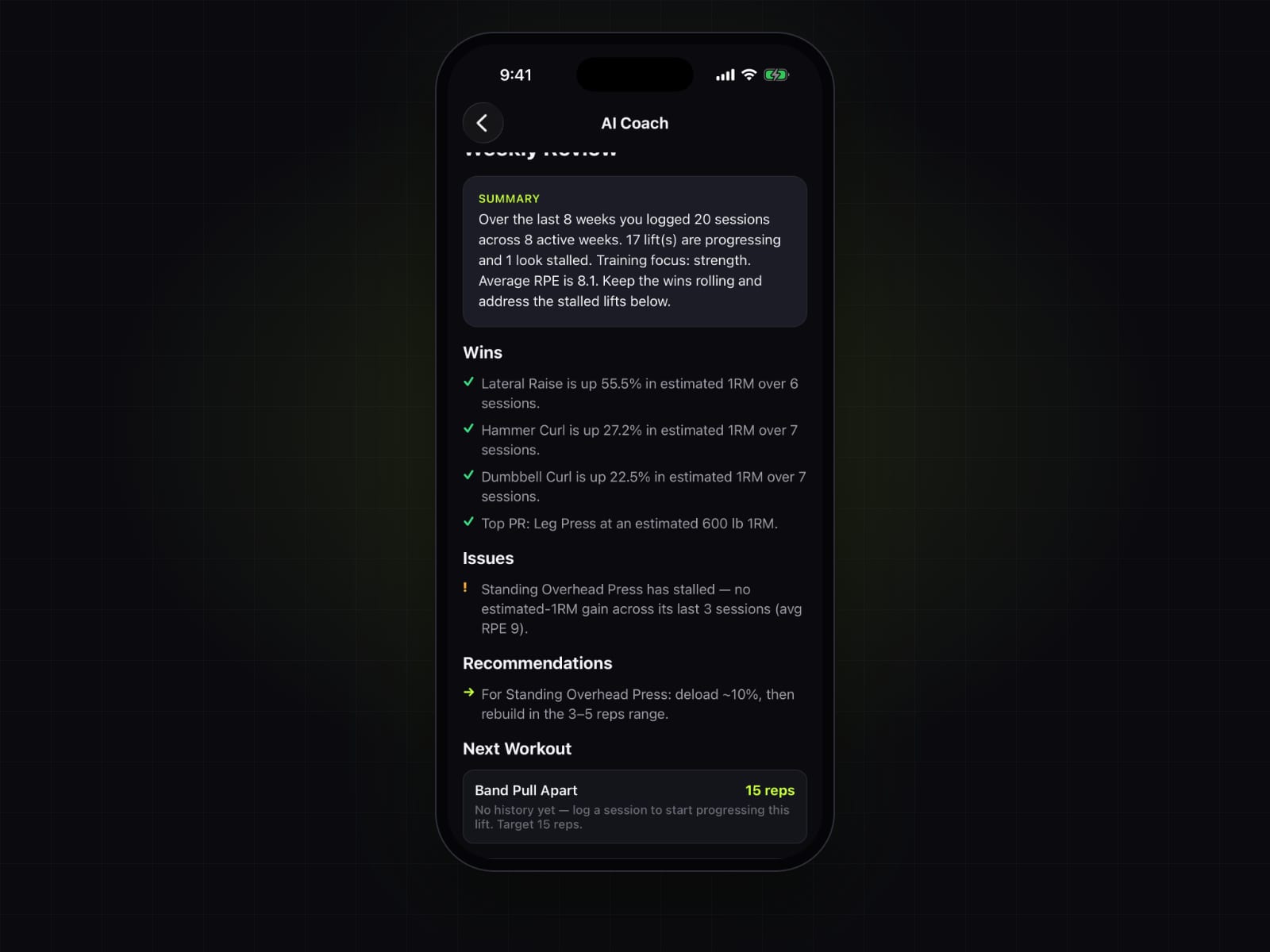 The weekly review: the engine finds the wins and the stalls, and the AI only polishes the wording.
And the AI part is opt-in. Before the coach runs for the first time, the app explains plainly what it is and isn't: software that can be wrong, general fitness information rather than medical advice, and no substitute for a doctor or a qualified coach. Sharing a training summary with OpenAI is a separate switch that starts off. If it's turned on, what goes is a summary of the training, such as lift trends, effort and goal, never the lifter's name or email, and OpenAI doesn't use it to train its models. With the switch off, the coach still works, running on the engine alone.
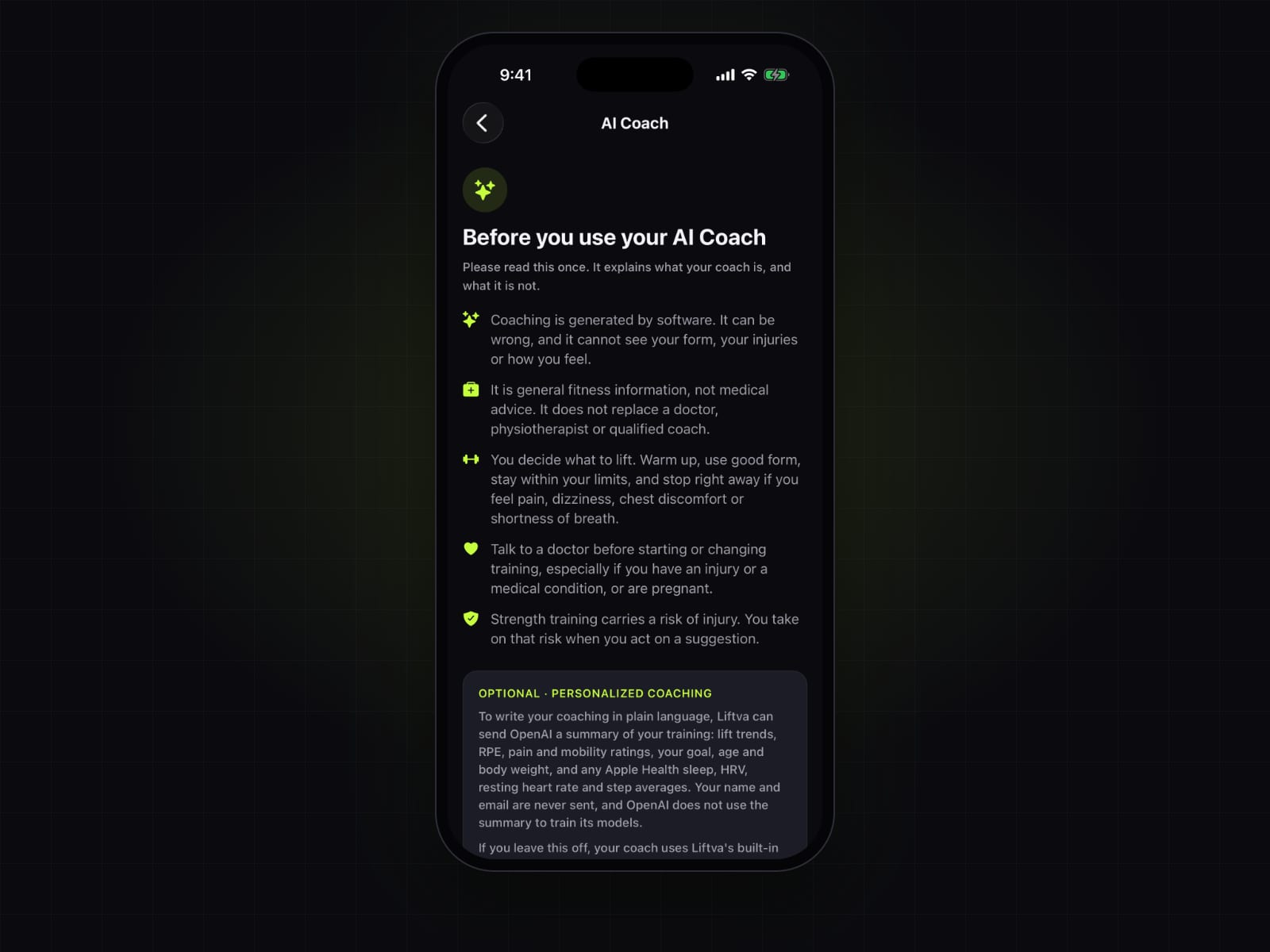 OpenAI is opt-in; without it the coach runs on rules alone.
That decision paid off three ways. Lifters can trust the suggestions because they can see the rule behind each one. The app keeps coaching when the AI service is slow or unavailable. And privacy-minded users get the whole product without sharing anything with a third party.
Free to train, Pro to progress faster
Pricing followed the same thinking: logging never goes behind a paywall. Unlimited workouts, the exercise library, programs, the dashboard, personal records and the lock-screen timer are all free. Liftva Pro ($9.99 a month, cancel any time through Apple) adds the AI weekly review, the next-workout plan with exact loads, strength trends, weekly volume by muscle and per-exercise analytics.
A lifter's history is theirs. Holding it hostage behind a subscription is a fast way to lose them; charging for the coaching on top of it is a fair trade.
Two smaller touches round it out. Referral codes give the lifter and a friend 30 days of Pro each. And through Lift For More, $1 from every Pro subscription each month goes to a mental health cause, with a live counter on the website showing the total committed so far.
The admin dashboard: running the business, not just the app
An app is a business, and a business needs to know what's happening in it. Liftva has its own admin dashboard, built for the people running the app rather than the people using it.
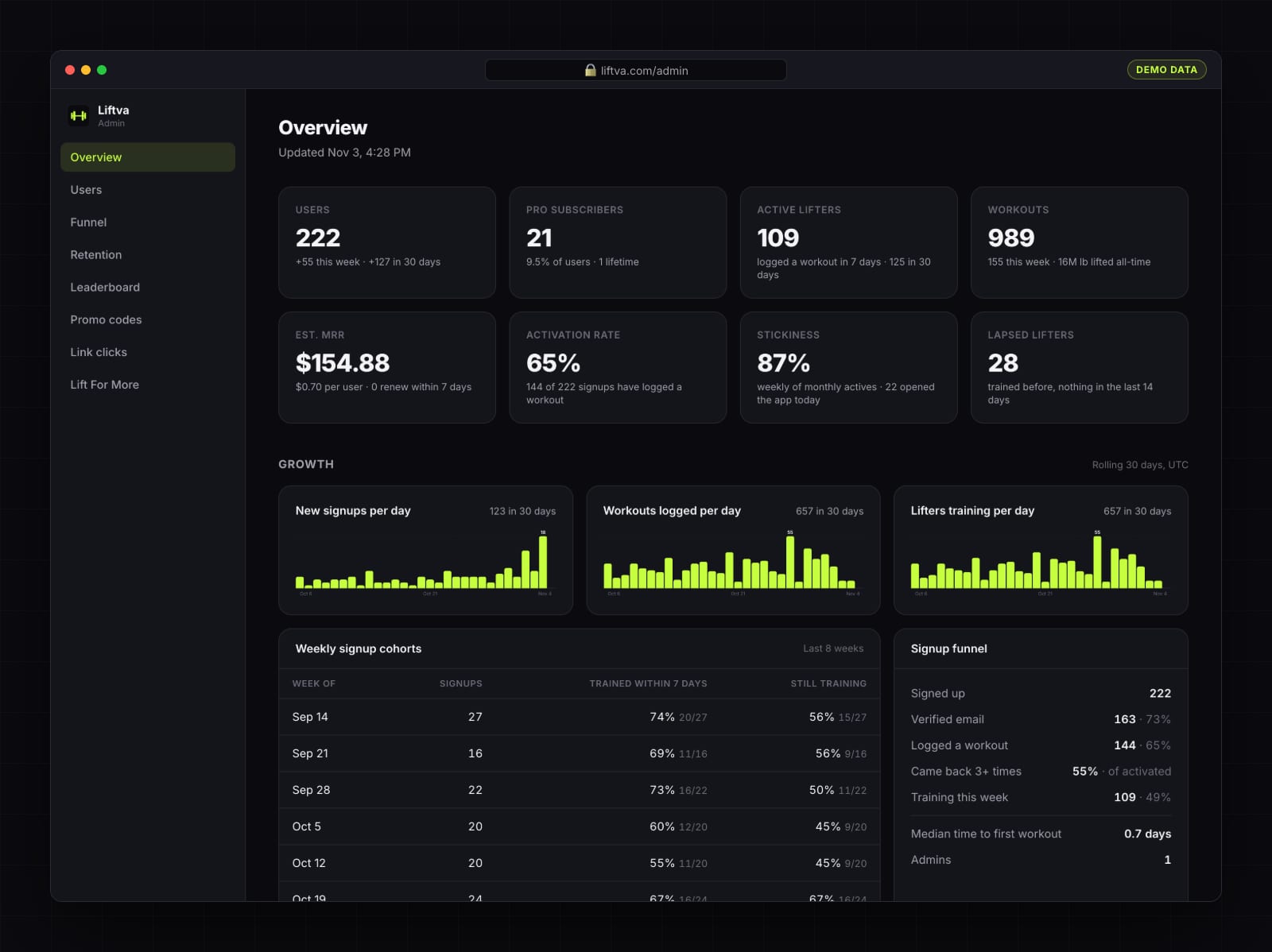 The admin overview. All of the admin screenshots in this post use made-up demo data.
The overview covers total users, Pro subscribers, active lifters, recurring revenue and activation (how many sign-ups go on to log a workout), plus daily charts for sign-ups, workouts logged and lifters training. From there:
- Users and user detail. Find any lifter by name or email, see their recent workouts and Pro status, and grant Pro, change a role or delete an account from one page.
- The activation funnel, step by step from opening the app to signing up, following a program, logging a first set, seeing the paywall and buying Pro, so it's obvious where people drop off.
- Cohort retention, showing how many people from each week's sign-ups are still training one, two and four weeks later. A cohort stays marked as pending until it has had its full week, so a half-finished week never looks like a drop in retention.
- Link clicks. Every App Store link on the website and in creator campaigns goes through one tracked link, so we can see which channel actually sends downloads.
- Promo and creator codes, created from the dashboard, with uses and conversions for each.
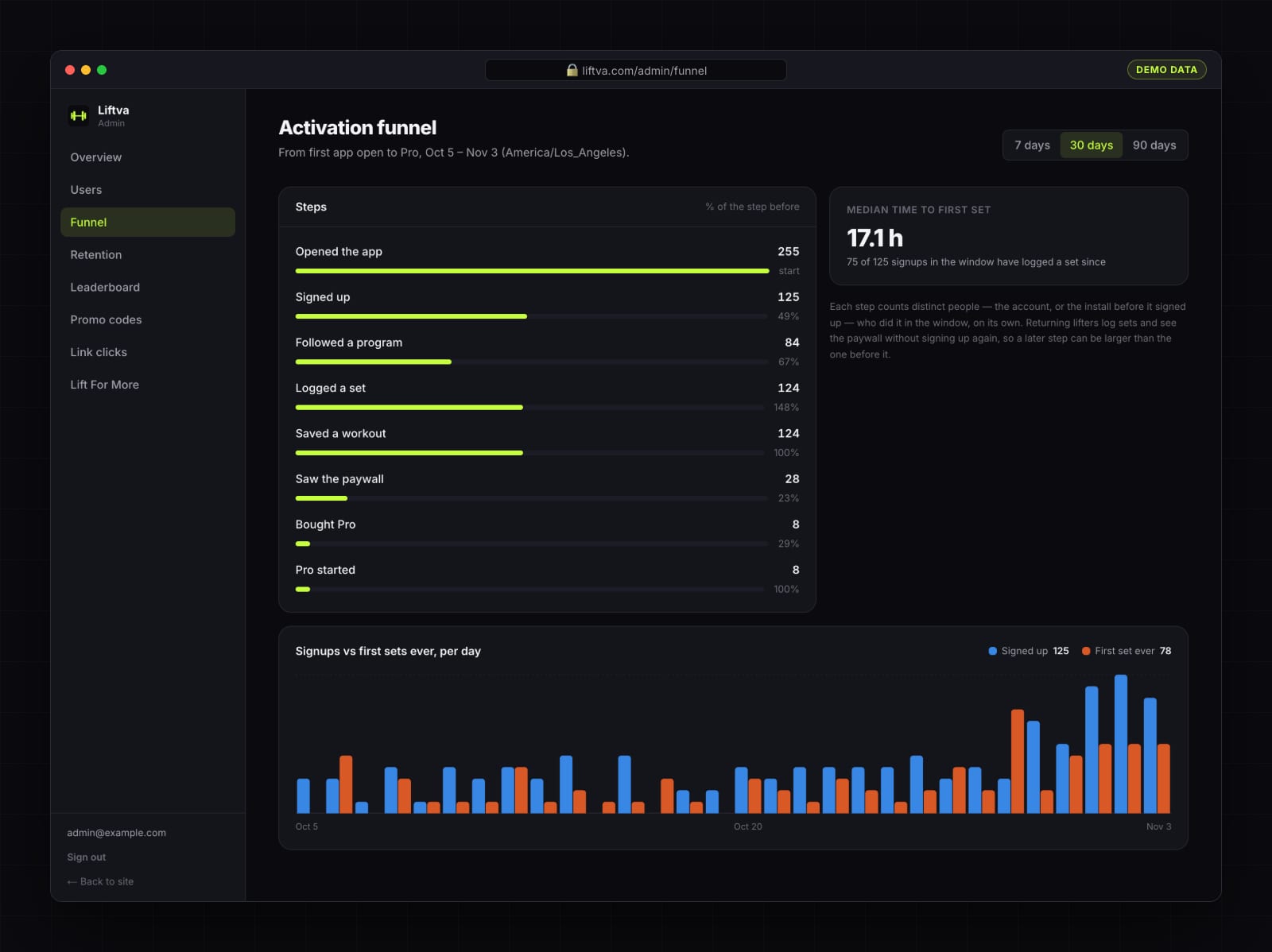 The activation funnel, counted from the app's own events with no third-party analytics tracker. (Demo data.)
Pro subscribers can also get a weekly training report by email every Monday, covering the week's volume, records, stalled lifts and next session. It only goes out after a week with a logged workout, so a quiet week doesn't get a pointless email.
The website does more than say "download"
liftva.com is the front door, and it opens on the product's promise: "Stop guessing. Start progressing.", beside an interactive phone demo.
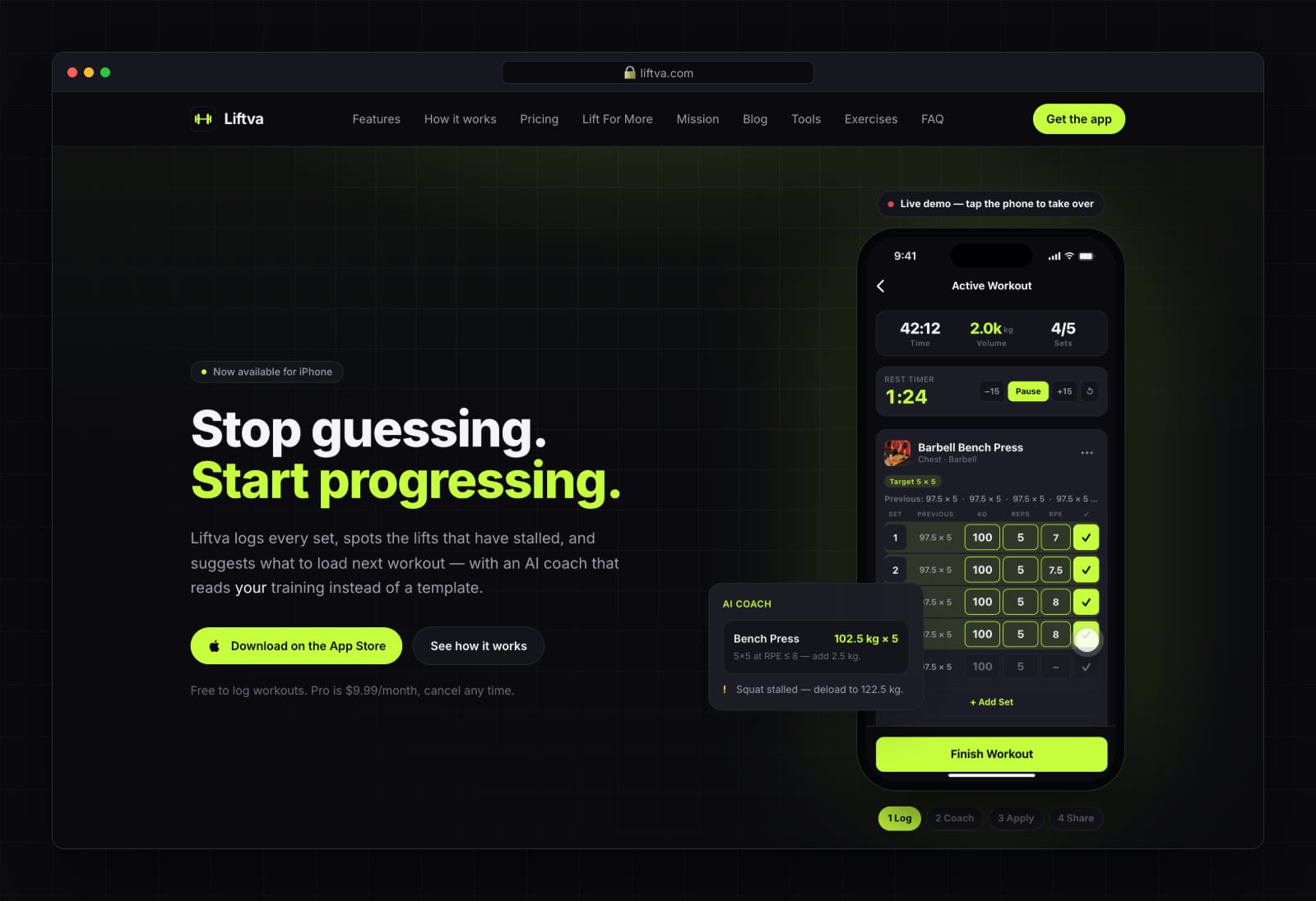 liftva.com at desktop width.
Most app websites stop at a hero and a download button. Liftva's is built to be found by the people the app is for, and to be useful before anyone installs anything:
- Free calculators for one-rep max, plate loading and progressive overload, each linking through to the app.
- An exercise library on the web, with a page for every exercise, drawn from the same catalogue the app uses.
- A training blog, with articles such as how much weight to add for progressive overload.
- Creator landing pages, so each fitness creator gets their own page and code, and every download they send can be counted.
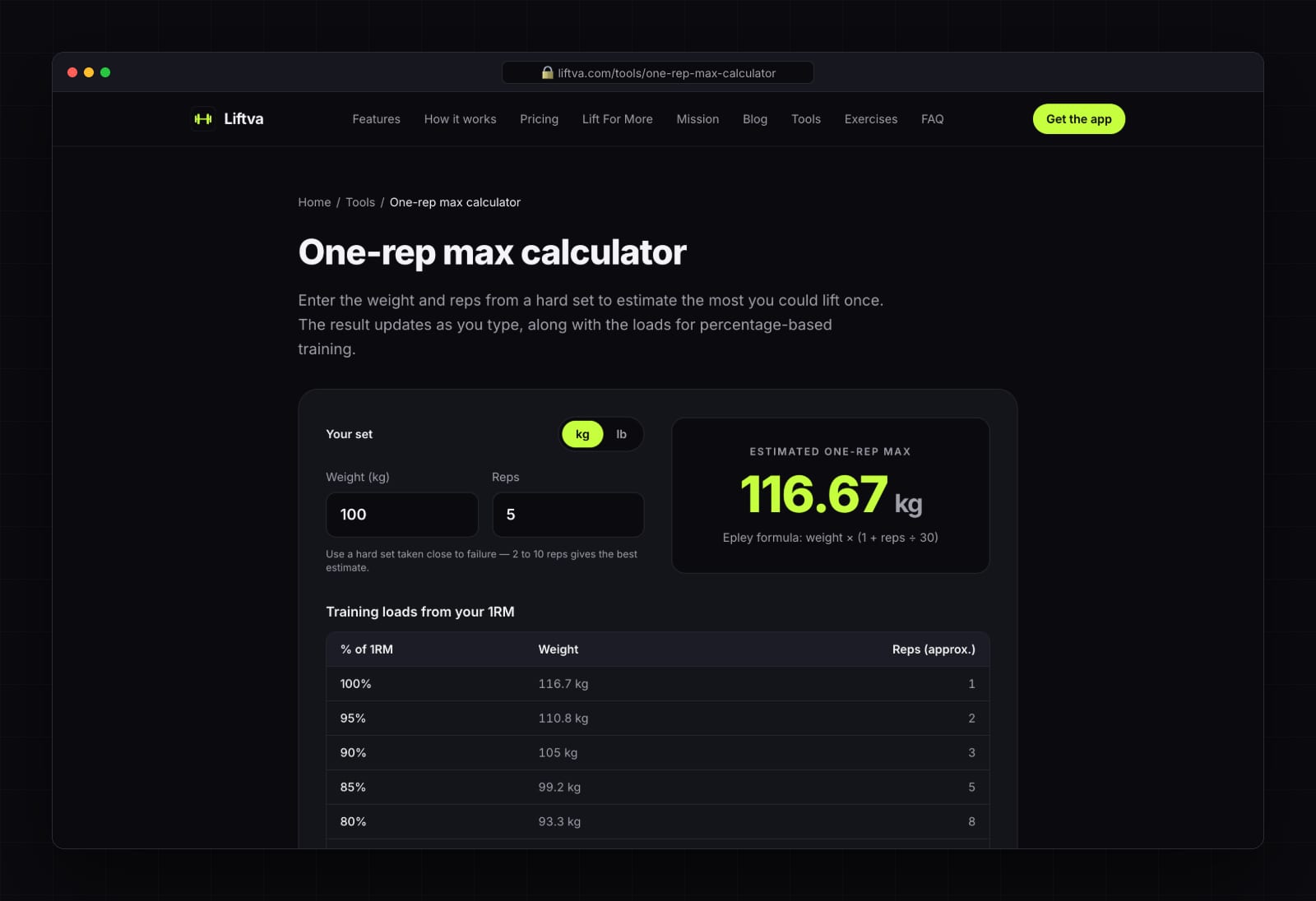 Free calculators on the site link through to the app.
Someone searching "how to calculate my one-rep max" isn't looking for an app yet. They're exactly the person who will want one, and now they've met Liftva by getting a straight answer.
What we'd tell anyone building a similar app
Keep the numbers out of the AI. If your app makes a decision that matters, whether that's a weight, a price, a dose or a date, make it with rules you can test and explain, and let the AI do what it's good at: putting that decision into words. You get trust, consistency and a product that still works when the AI service doesn't.
Ask before changing anything. Liftva could quietly update a program after every workout. Instead it shows every change and waits for Apply. People trust a coach who explains, not one who overrides.
Don't paywall the thing people put in. Charge for what you add on top of the user's data, not for access to it.
Make AI consent a real choice. An opt-in switch that starts off, and a product that still works if it stays off, earns more trust than a long privacy policy.
Build your own numbers from day one. A funnel, cohort retention and channel tracking cost little to set up at the start and are painful to piece together later. They're how you know whether a change helped.
Planning an app of your own?
Liftva is a good example of what we like building: a focused product where the hard part is a real decision, made carefully, and wrapped in an experience simple enough to use between sets.
KeyesCode designs and builds mobile apps and AI features for businesses that want them to work in the real world, not just in a demo. If you're weighing an AI feature, our AI automation page is a good place to start. Or get in touch and tell us what you're building.
You can see Liftva for yourself at liftva.com or on the App Store.
Frequently asked questions
What is Liftva?
Liftva is an iPhone workout tracker for strength training. It logs every set, tracks your estimated one-rep max for each lift, flags lifts that have stalled, and plans your next workout lift by lift. An AI coach explains the plan and writes a weekly review. Logging is free; Liftva Pro adds the AI coaching and deeper analytics.
Does Liftva's AI make up the weights it suggests?
No. Every load and rep target comes from a progression engine with fixed rules that runs on your own set history. The AI only writes the explanation around those numbers, and if it drops or changes one, the engine puts the original back.
How does Liftva decide a lift has stalled?
It tracks your estimated one-rep max across your last three sessions of that lift. If it never beat where those three sessions started, or gained under 1% while your effort climbed, the lift is flagged as stalled and the coach suggests a deload of about 10%.
Does Liftva share my data with OpenAI?
Only if you turn it on. Sharing a training summary with OpenAI is a separate opt-in switch that starts off. It sends a summary of your training, never your name or email, and OpenAI does not use it to train its models. With it off, the coach still works using the progression engine alone.
How much does Liftva cost?
Logging, the exercise library, programs, the dashboard, personal records and the lock-screen rest timer are free with no limits. Liftva Pro is $9.99 a month, cancellable any time through Apple, and adds the AI weekly review, next-workout plans and deeper analytics.
Is Liftva available on Android?
Liftva is iPhone-only today. Android is on the roadmap.
Have a project in mind?
Tell us what you're trying to build or fix, and we'll give you a straight answer on what we'd do next. No pitch, no pressure.